
TikTok Bulk Downloader
Download every video from a public TikTok account at once. Enter a username, choose how many, and they arrive in one ZIP, without the watermark if you like.
Public accounts only. Single videos are free; a batch uses credits, charged only for the videos that make it in.
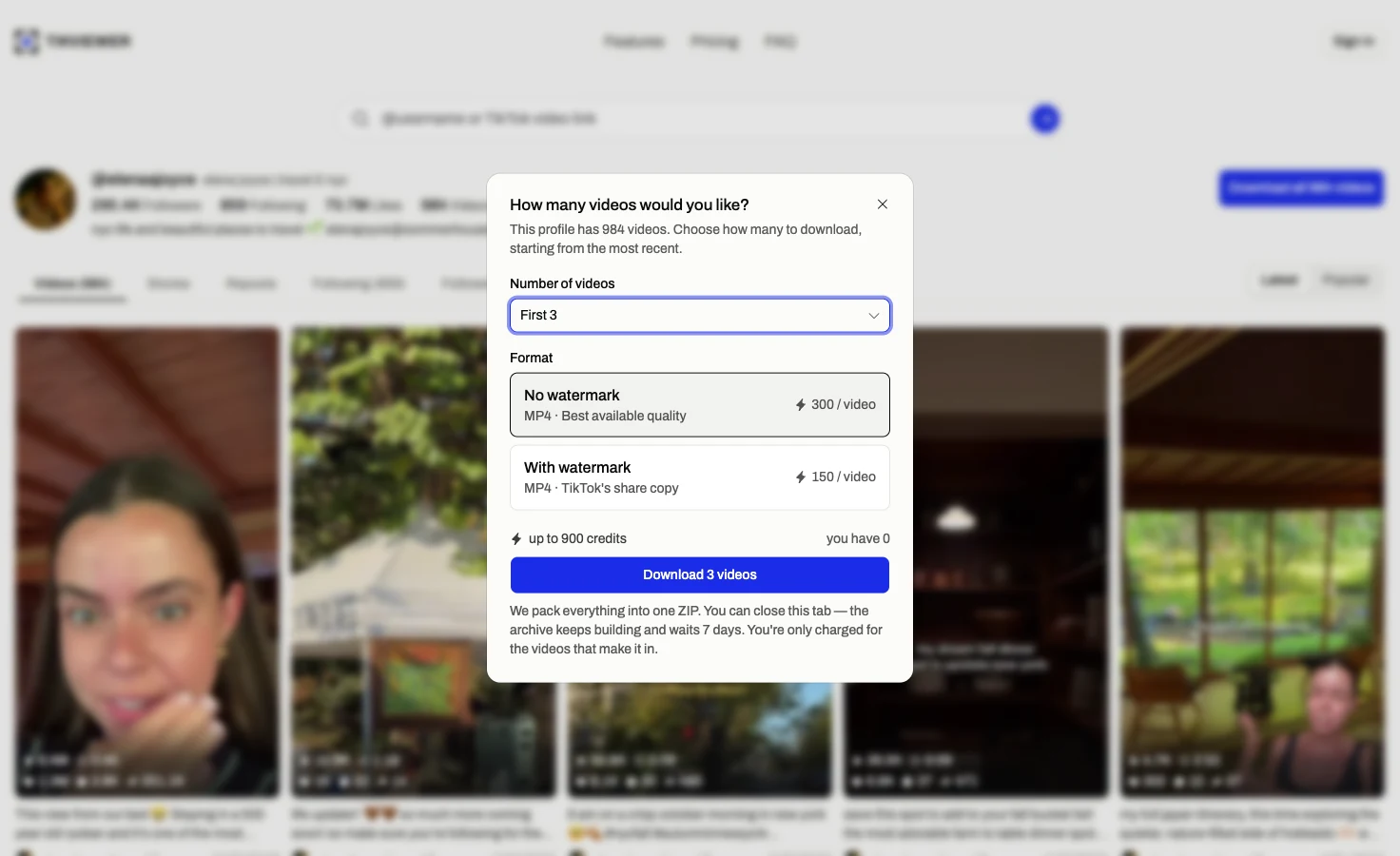
How to use the TikTok bulk downloader
- 01
Download by username
Type the handle with or without the @, or paste the profile link. The account opens on its Videos tab, with Download all and its video count at the top.
- 02
Choose how many and which file
Take the latest 3, 10, 30, 100, 300 or 1,000 videos, the whole profile up to 2,500, or a number of your own. Then pick no watermark or TikTok’s watermarked copy.
- 03
Save one ZIP
Every video goes into a single archive, newest first. You can close the tab while it builds: the run keeps going, and the ZIP waits seven days.
What a batch download covers
It saves what a public account has posted, newest first. It does not open private accounts, and it charges only for files that actually arrive.
It does
- Save a profile’s videos without the watermark
- Take from 3 to 2,500 videos in one run
- Pack them into a single ZIP
- Keep going after you close the tab
- Save an account’s live stories in one click
It does not
- Open a private account’s videos
- Save MP3 audio in bulk
- Download liked, favorited or playlist videos
- Hand-pick videos from the grid for one ZIP
- Run two batches at the same time
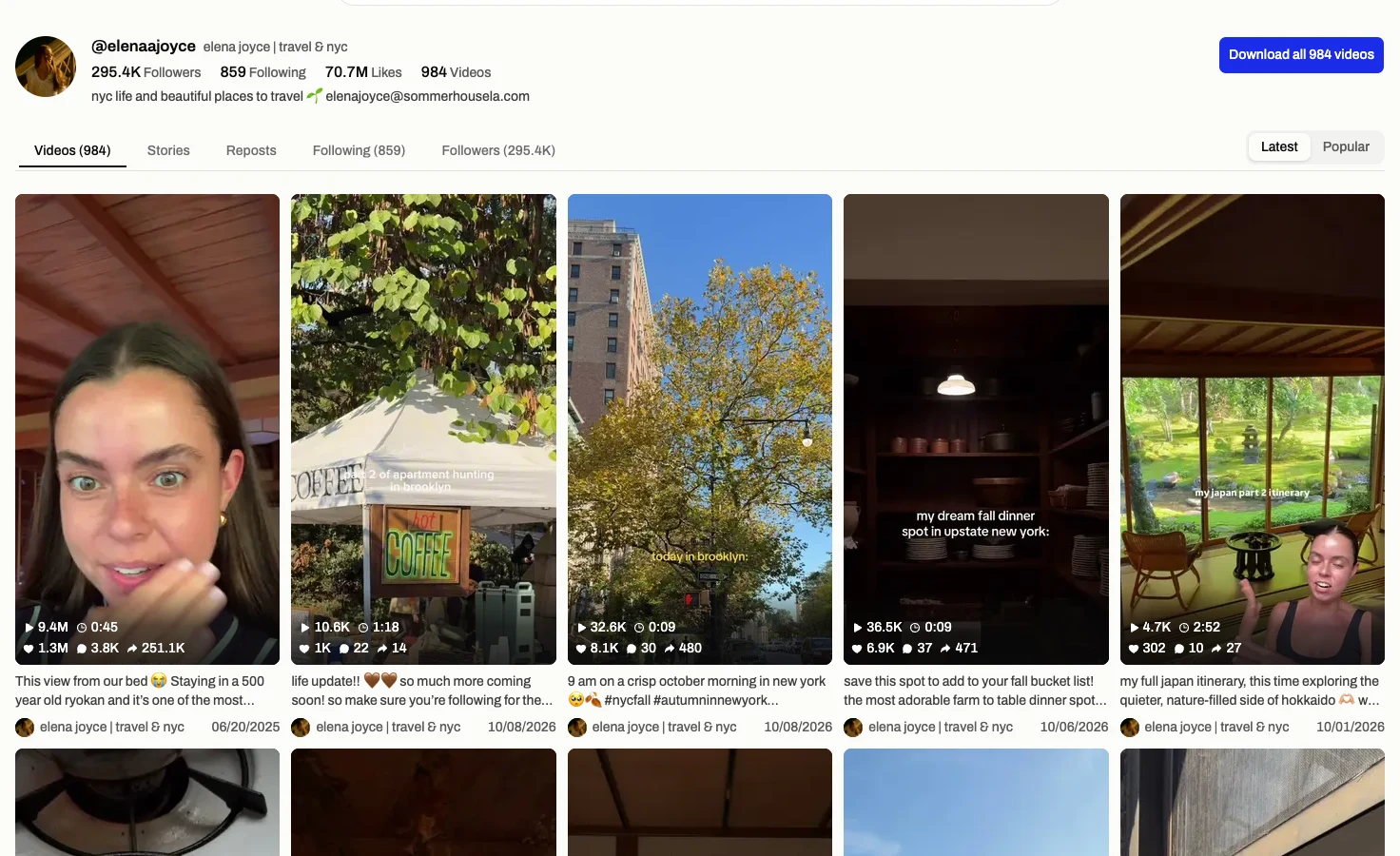
The whole account behind one button
This works as a TikTok account downloader: the username is the only thing you need. There is no list of video links to collect and paste, which is what saving a profile one post at a time comes down to.
The button carries the profile’s own video count, so you know what you are asking for before you ask. The grid stays underneath, and any single video still saves free.
Nothing uses your TikTok account. The lookup runs on our side, so the account you are saving has no way to see that you did.
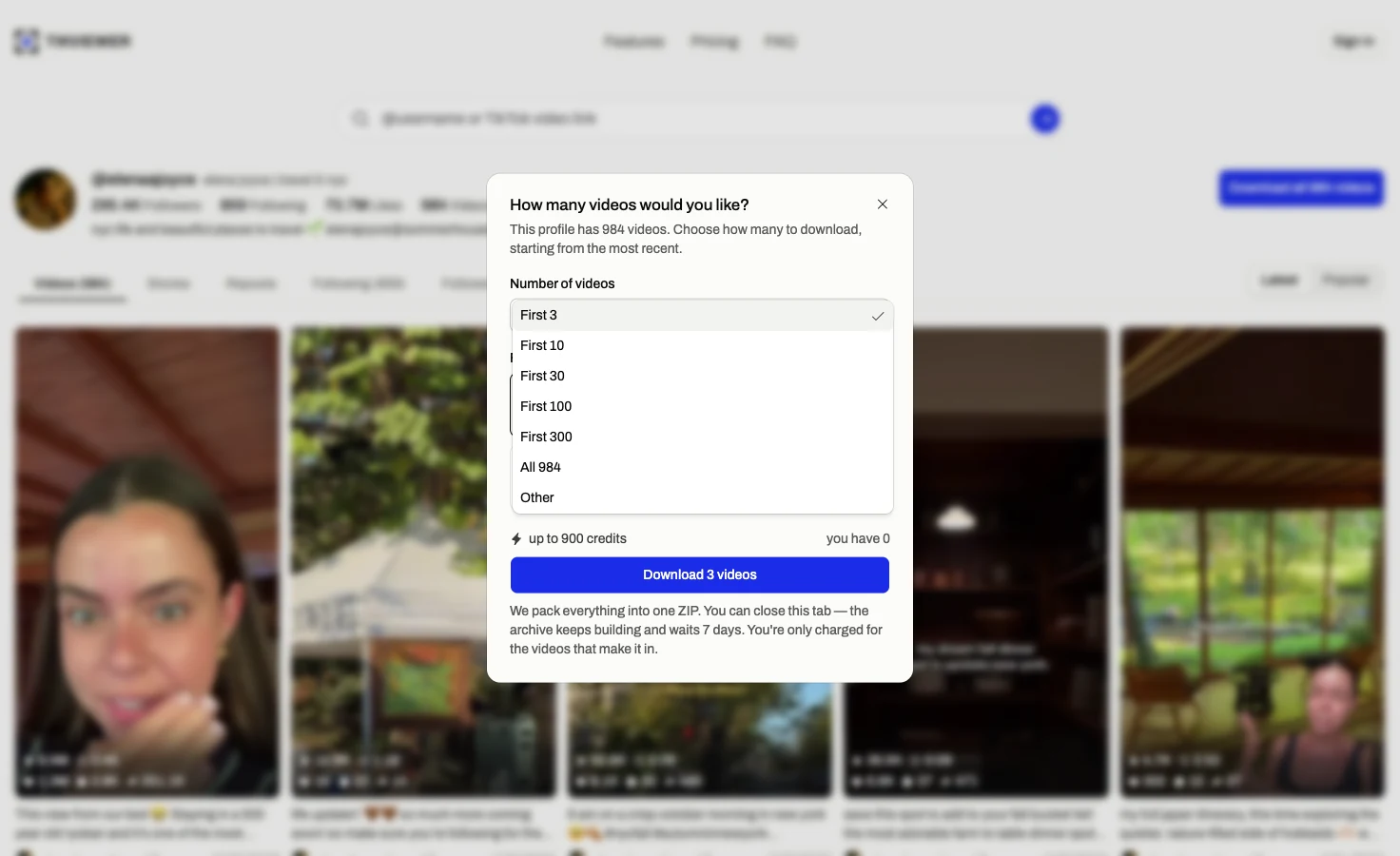
Pick how many, and whether the watermark stays
Counts run from the most recent video back: the latest 3, 10, 30, 100, 300 or 1,000, every video when the profile has 2,500 or fewer, or any number you type.
Without the watermark is the best quality TikTok serves, at 300 credits a video. TikTok’s own watermarked share copy is 150. The dialog shows the most the run can cost before you start.
Either way you pay only for the videos that make it into the ZIP. A video deleted or made private partway through is left out, listed in the archive and not charged.
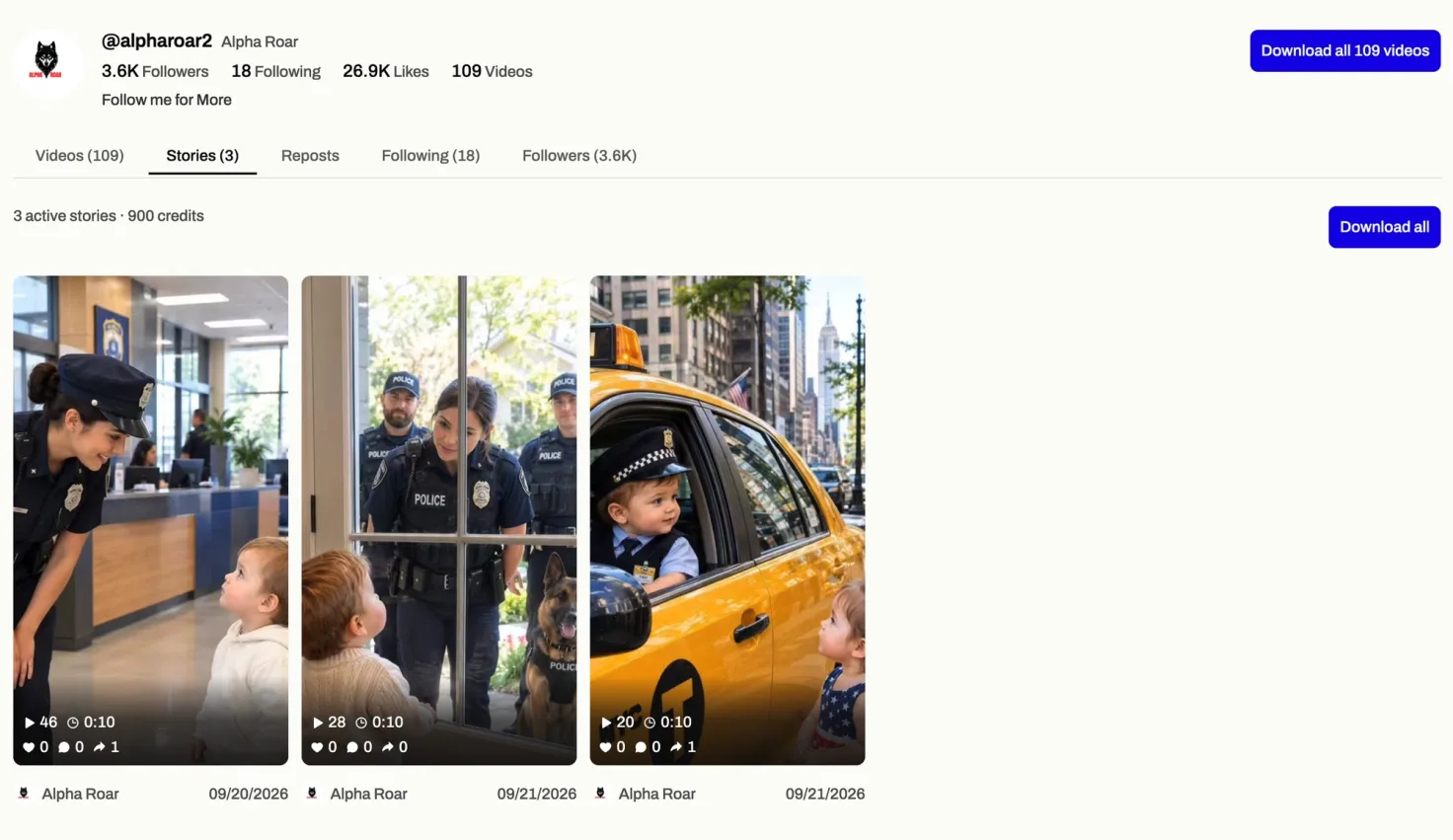
A day of stories, all at once
Stories have their own Download all on the Stories tab. It takes every story the account has live into one ZIP, always without the watermark, at the same 300 credits each.
There is nothing to choose: an account rarely has more than a handful up, and TikTok removes each one 24 hours after it was posted.
When stories are all you came for, the story downloader opens a username straight on that tab.
Useful when one video at a time is too slow
- Creators
- Back up everything you have posted before you switch phones, clear out the profile or lose the original files.
- Reels and Shorts
- Take your own videos without the watermark and re-edit them for Instagram Reels or YouTube Shorts.
- Researchers and agencies
- Keep a creator’s or a competitor’s posts offline to study their hooks, formats and topics at your own pace.
Single videos are free. Batches use credits.
$0
No card. Credits land the moment you sign up.
- Browse comments and replies — unlimited
- Single downloads, TikTok's watermarked share copy — unlimited
- Single downloads, no watermark at best available quality — unlimited
- Single downloads, audio (MP3) — unlimited
- 2,000 credits on sign-up for batch downloads and comment exports
- No TikTok account or login required
$5.00/mo
Billed annually · Save 50% vs monthly.
- 200,000 credits per month
- About 1,333 videos or 200,000 comments
- Batch download an entire profile
- Include comment replies
- Video download, with or without watermark
- Audio download (MP3)
- No TikTok account or login required
- Priority support
$7.50/mo
Billed annually · Save 50% vs monthly.
- 500,000 credits per month
- About 3,333 videos or 500,000 comments
- Batch download an entire profile
- Include comment replies
- Video download, with or without watermark
- Audio download (MP3)
- No TikTok account or login required
- Priority support
$9.99/mo
Billed annually · Save 50% vs monthly.
- 750,000 credits per month
- About 5,000 videos or 750,000 comments
- Batch download an entire profile
- Include comment replies
- Video download, with or without watermark
- Audio download (MP3)
- No TikTok account or login required
- Priority queue
- Priority support
A video in a batch costs 300 credits without the watermark or 150 with it, charged only when it makes it into the ZIP. A new account starts with 2,000 credits. Viewing profiles and saving one video at a time cost nothing.
Bulk download questions
How do I download all videos from a TikTok account at once?
Enter the username in this TikTok bulk downloader, press Download all, choose how many videos and which format, and start the run. Every video goes into one ZIP that you save when it is ready.
Can I bulk download TikTok videos without the watermark?
Yes. No watermark is the default format in the dialog, at 300 credits a video. If you want TikTok’s own share copy with the watermark, choose it instead at 150.
How many videos can I download at once?
Up to 2,500 in one run, counted from the most recent. Pick a preset from 3 to 1,000, the whole profile if it has 2,500 videos or fewer, or type your own number. One batch runs at a time per account.
Do I need an extension or a script to mass download TikTok videos?
No. It is a web page, so there is no Chrome extension, desktop app or GitHub script to install. It works the same in any browser on a phone or a computer.
Can I download all my own TikTok videos?
Yes, while your account is public. Enter your own username and take everything you have posted into one ZIP, without the watermark, as a backup or to re-edit elsewhere.
Can I download videos from a private account?
No. A private account’s videos are limited to the followers it approves, and this page does not ask for a password or have any way around that.
Can I close the page while it downloads?
Yes. The archive builds on our side, not in your browser. Come back to the same profile while signed in and the ZIP is there to save for seven days.
What happens if some videos fail?
They are left out and not charged. A video can be deleted, made private or region-locked between being listed and being fetched; the archive includes a short file naming any that were missed.
Is bulk downloading free?
Saving one video at a time is free, up to 20 a day without an account and with no cap once you sign in. A batch needs a free TikViewer account and uses credits, and a new account starts with 2,000.
Can I bulk download stories, reposts or liked videos?
Stories, yes: the Stories tab has its own Download all. Reposts and liked videos are not available in bulk; a repost opens and saves one at a time like any other video.
Is TikViewer connected to TikTok?
No. TikViewer is independent and unaffiliated. TikTok is a trademark of its owner.
Download a whole TikTok profile
A bulk video downloader for TikTok that needs only a username. Choose how many, close the tab if you like, and save one ZIP.
Public accounts only. Batches use credits and are charged only for videos that make it into the archive.